CDN to Origin Certificates: Your Own CA with OpenSSL
Certificate pinning doesn't scale. Here's how to run your own CA instead.
There’s a common assumption that because a CDN handles the TLS connection your users see — the certificate shown in the browser’s address bar — you don’t need to think too hard about certificates on your origin. That’s wrong, and the consequences show up as cryptic error codes rather than obvious failures.
A CDN like Akamai doesn’t act as a transparent tunnel. It terminates the TLS session from the client, inspects and processes the request, then opens a new TLS session toward your origin. Two separate connections, two separate certificate validations.
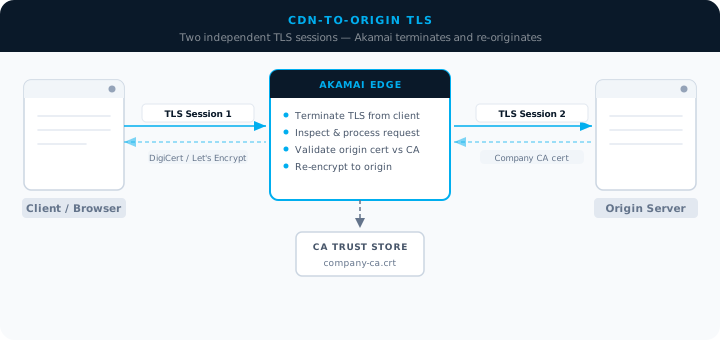
If your origin presents a certificate that Akamai can’t validate, the request fails at the second hop — after the client session was already accepted. The user sees an error. The logs show a reference ID like 30.xxx. The certificate on your public-facing domain is fine. The problem is entirely on the internal leg that most people never think about.
The two options Akamai gives you
When Akamai tries to validate your origin certificate, it checks the certificate against its trust store. There are two ways to make that validation succeed:
Pin the specific certificate. You upload the exact certificate your origin is presenting, and Akamai is told to trust that one certificate. Simple to set up, and it works. The problem is that it doesn’t scale. If you have multiple properties, multiple origins, or you rotate certificates regularly, you’re managing a growing list of pinned certificates across multiple Akamai configurations. When a certificate expires and you replace it, you need to update the pin. One missed rotation window means an outage.
Trust the Certificate Authority. You upload the CA certificate that signed your origin certificates, and Akamai trusts any certificate issued by that CA. This is the approach that scales. One CA certificate in the Akamai trust store covers every origin certificate signed by it, across all your properties, for the life of the CA.
Many organisations already have an internal CA: Active Directory Certificate Services if they’re running Microsoft infrastructure, or cert-manager if they’re on Kubernetes. If you already have one, the answer is straightforward — export the CA certificate and upload it to Akamai’s trusted CA configuration in your property.
If you don’t have one, you can create one. Here’s how to do it with OpenSSL.
Creating a CA and signing origin certificates
Start with the CA itself. This generates the root key and self-signed certificate that Akamai will trust:
# Create the CA private key
openssl genrsa -out company-ca.key 4096

# Create a self-signed CA certificate (valid for 10 years)
openssl req -x509 -new -nodes -key company-ca.key \
  -sha256 -days 3650 \
  -out company-ca.crt \
  -subj "/C=GB/ST=England/L=London/O=My Organisation/CN=My Internal CA"
The output is two files: company-ca.key (the private key — keep this secure and offline if possible) and company-ca.crt (the certificate — this is what you upload to Akamai’s trust store).
With the CA in place, generate a certificate for each origin server. This is a two-step process: create the private key and a Certificate Signing Request, then sign the CSR with your CA:
# Create the origin server private key
openssl genrsa -out origin.key 2048

# Create the Certificate Signing Request
openssl req -new -key origin.key \
  -out origin.csr \
  -subj "/C=GB/ST=England/L=London/O=My Organisation/CN=origin.example.com"

# Sign the CSR with your CA
openssl x509 -req -in origin.csr \
  -CA company-ca.crt -CAkey company-ca.key -CAcreateserial \
  -out origin.crt -days 365 -sha256
Install origin.key and origin.crt on your origin server (or load balancer). The origin.csr file is no longer needed once the certificate is signed.
To verify the chain before deploying:
# Verify the origin cert is signed by your CA
openssl verify -CAfile company-ca.crt origin.crt

# Inspect the certificate details
openssl x509 -in origin.crt -text -noout
You’re looking for Verification: OK on the first command, and the correct CN and validity period on the second.
Configuring Akamai to trust your CA
In Akamai Control Center, navigate to your property’s origin configuration. Under the origin TLS settings, there’s an option to add a trusted CA certificate. Upload the contents of company-ca.crt. Akamai will now accept any certificate signed by that CA when connecting to origins on that property.
If you’re managing multiple properties, you can add the same CA certificate to each one. Akamai also supports bundling multiple CA certificates in a single PEM file if you’re consolidating trust across different internal CAs.
A few things worth keeping in mind
Protect the CA private key. If it’s compromised, an attacker can issue certificates that your infrastructure will trust. For production CAs, keep the private key on an air-gapped system or in a hardware security module. Don’t store it on the origin servers or anywhere the application stack can reach.
Set realistic validity periods. One year for leaf certificates (-days 365) is a reasonable default. Shorter is better from a security standpoint; longer reduces operational overhead. The CA certificate itself can be valid for longer (ten years is common) since rotating a CA means updating trust configurations everywhere it’s been deployed.
Build a renewal process before you need it. The failure mode for an expired origin certificate is an outage that looks inexplicable from the client side. Set a calendar reminder at least 30 days before expiry. If you’re operating at any scale, automate the renewal — cert-manager on Kubernetes handles this natively; for other environments, a simple cron job running the OpenSSL commands above is enough.
Multiple CA certificates in one bundle. Akamai accepts PEM bundles with multiple CA certificates, which is useful if you’re consolidating origins that have historically used different CAs. Concatenate the certificates into a single file and upload the bundle.
The CDN-to-origin TLS leg is one of those areas where problems only become visible under the worst circumstances — a rotation goes wrong, or a property is migrated and the cert trust configuration isn’t carried over. Getting it right once, with a proper CA-based approach, is a lot less work than debugging outages at 2am.