CDN Configuration Mistakes That Silently Slow Your Site
The quiet misconfigurations - cache keys, TTLs, Vary headers, missing origin shield, stale compression - that bleed origin capacity without ever turning a dashboard red. An engineer's field guide, plus why 2026's bot traffic raises the stakes.
A misconfigured CDN almost never announces itself. There’s no outage, no alert, no red square on the dashboard. The vendor console shows a cache-hit ratio of 95% and a reassuring map of green points of presence, and everyone moves on. Meanwhile your origin egress bill creeps up quarter on quarter, your P75 Time to First Byte in a few regions drifts past a second, and your conversion rate softens by an amount nobody can quite pin on anything.
That’s the failure mode I see most often when we audit a CDN that’s been running untouched for a year or two. The site isn’t broken. It’s just doing a fraction of the work the edge was bought to do, and the cost is spread thinly enough across the origin, the latency budget and the cloud invoice that no single owner notices it.
This is a field guide to the misconfigurations behind that pattern. Most of them come down to one number that most teams never look at properly, and a handful of header decisions that got made once, by a framework default or a hurried deploy, and were never revisited. None of them are exotic. That’s exactly why they survive.
The short version: the aggregate cache-hit ratio your vendor shows you is close to meaningless, because static assets inflate it. The number that matters is the hit ratio on your HTML and API responses, and it’s usually being wrecked by three things: cookies, query strings and over-broad
Varyheaders fragmenting the cache key. Add TTLs set to zero by default, a missing parent cache tier, and assets still shipping as gzip and JPEG, and your origin is doing work the edge should have absorbed. In 2026 that waste compounds, because roughly a third of web traffic is now automated and AI crawlers are actively churning the cache your human visitors depend on.
The metric you are probably not watching
We covered the four numbers that decide whether a CDN is paying for itself in the CDN math post, and I won’t repeat that here. But one of them deserves a closer look, because it’s the root cause of most of the slowdowns in this article: cache-hit ratio, measured by content type.
The aggregate figure is the problem. A typical page pulls in dozens of static files (scripts, stylesheets, fonts, images) and a small number of dynamic responses (the HTML document, a few API calls). The static files cache trivially and sit at 99% or higher. They dominate the request count, so they drag the blended average up to something that looks excellent. A 95% aggregate hit ratio can comfortably contain a catalogue-HTML hit ratio of 40% and an API hit ratio in the teens, and you’d never see it in the headline number.
What you actually want to know is the hit ratio for each class of content:
- Static assets (JS, CSS, fonts, images): 99%+. Anything lower points at versioning or TTL problems.
- Cacheable HTML (catalogue, landing, content pages): 70-90% is achievable with correct cache-key and
Varyhandling. - API responses for read-heavy, shareable endpoints: 20-60% is realistic, and most teams leave this at zero without ever asking whether it could be higher.
Every cache miss is a request your edge forwarded to origin: a round trip your user waits on, compute your origin pays for, and bytes on your egress bill. So when the HTML hit ratio quietly sits at 40%, more than half of your most latency-sensitive requests are travelling the full distance to origin and back. The dashboard still says 95%. The customer still waits.
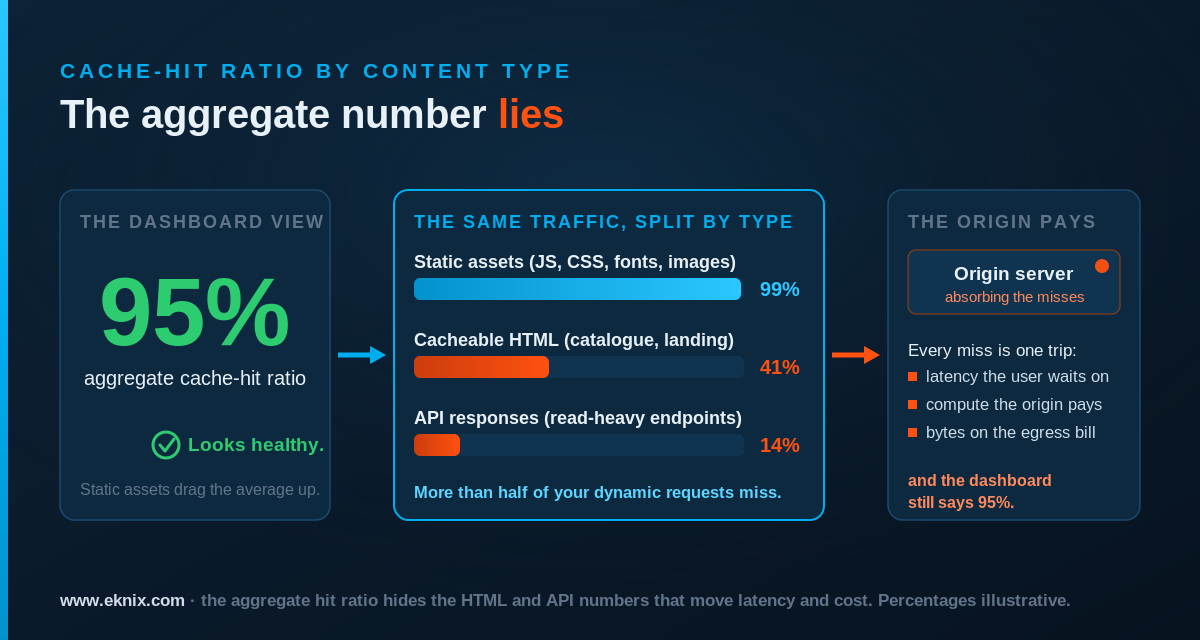
If you take one thing from this piece, make it this: stop looking at the aggregate cache-hit ratio and start looking at it segmented by content type. Almost everything below is a specific reason that segmented number is lower than it should be.
Why a sloppy cache config costs more in 2026
Before the specifics, it’s worth saying why this matters more now than when most of these configs were written.
For most of the CDN era, the cost of a poor cache-hit ratio was paid by humans: a slower page, a bigger origin, a larger bill. The traffic mix has changed. Cloudflare’s network data puts automated traffic at around 32% of all requests, and the fastest-growing slice of that is AI crawlers feeding training pipelines and retrieval-augmented answers. Cloudflare’s own analysis found that roughly 80% of self-identified AI bot activity is for training, and that these crawlers behave nothing like a human visitor.
The difference matters for your cache specifically. A human session revisits a handful of popular URLs, which is exactly the pattern edge caches are built for. AI crawlers do the opposite. They walk deep into the long tail of a site, request an extremely high proportion of unique URLs (Cloudflare’s modelling shows unique-access ratios of 70-100%), follow inefficient paths that throw off 404s and redirects, and reuse no browser cache or session between requests, so each crawler instance arrives at your edge looking like a brand-new visitor. Common Crawl data shows that over 90% of pages on the web are unique by content, which is the haystack these bots are scanning in full.
The result is that crawler traffic churns the edge cache your customers rely on. Caches evict on a least-recently-used basis, and a crawler dragging thousands of rarely requested pages through the edge pushes the genuinely popular objects out of cache, raising the miss rate for everyone behind it. Wikimedia reported a 50% jump in multimedia bandwidth in 2025 driven by bulk scraping for model training; project after project, from Read the Docs to Fedora, has logged the same story of bots downloading large files repeatedly and slowing the site for real users.
And these visits don’t pay you back. The crawl-to-refer ratio (how many pages a platform crawls for every visitor it sends you) ran into the tens of thousands to one for the most aggressive AI operators through 2025. So a cache configuration that merely wasted a little origin capacity in 2023 now hands that capacity to automated clients that will never convert, never subscribe and never click an ad. Getting the cache right isn’t only a performance and cost question any more. It’s increasingly the line between serving humans well and subsidising someone else’s training run.
Cache-hit-ratio killers: the cache key
When a CDN receives a request, it builds a cache key to decide whether it already holds a matching response. By default that key is roughly the host plus the path plus the query string. Every input you add to the key multiplies the number of distinct objects the cache has to store and serve, and every multiplication lowers your hit ratio. Most ruined HTML hit ratios trace back to three inputs nobody meant to add.
Cookies
This is the most common offender by a distance. Most CDNs will refuse to serve a cached response, or refuse to store one, when cookies are in play, on the entirely reasonable assumption that a cookie signals a personalised or authenticated response. The trouble is that analytics tags, consent managers and A/B frameworks set cookies on everyone, including first-time visitors reading a fully cacheable marketing page. The presence of a _ga cookie doesn’t make your homepage personal, but a default cookie configuration treats it as if it does, and quietly sends every request to origin.
The fix is to be deliberate about which cookies actually affect the response. Strip or ignore analytics and consent cookies at the edge for content that’s identical for all users, and reserve cookie-based cache bypass for the genuinely per-user routes (cart, account, checkout). On most sites this single change moves the catalogue and content hit ratio more than any other.
Query strings
By default the full query string is part of the cache key, so ?utm_source=newsletter and ?utm_source=twitter&gclid=... get stored as completely separate objects from the clean URL, despite returning identical content. A marketing campaign that appends tracking parameters can fragment one cached page into thousands of distinct cache entries, each one a near-guaranteed miss. The same thing happens with reordered parameters: ?a=1&b=2 and ?b=2&a=1 are different keys for the same page.
Normalise the query string at the edge. Strip the marketing and tracking parameters (utm_*, gclid, fbclid, and friends) from the cache key while still passing them through to analytics, sort the parameters that remain into a canonical order, and explicitly allow-list only the parameters that genuinely change the response, like a product variant or a page number.
Vary
The Vary response header tells the cache to store a separate copy for each distinct value of a named request header. Used precisely it’s essential; used carelessly it’s a cache-hit-ratio grenade. Vary: User-Agent is the classic example: there are tens of thousands of user-agent strings in the wild, so varying on it shatters your cache into thousands of fragments that almost never get reused. Vary: Cookie is worse, for the cookie reasons above.
Keep Vary to the low-cardinality headers that genuinely change the bytes you return, like Accept-Encoding (you do need to vary on that) and, where you do device-specific work, a normalised device-class header rather than the raw user agent. If you’re serving responsive markup that adapts in the browser, you very likely shouldn’t be varying on User-Agent at all.
A quick way to see the damage from any of the three: pull the response headers and watch for Set-Cookie on pages that should be anonymous, raw Vary values, and an X-Cache (or equivalent) that says MISS on a page you’ve loaded three times in a row.
# Inspect what the edge is actually doing with a URL
curl -sS -D - -o /dev/null "https://www.example.com/category/shoes?utm_source=test" \
  | grep -iE 'cache-control|x-cache|age|vary|set-cookie|cf-cache-status|x-check-cacheable'
If Age resets to 0 on every request, the object isn’t being served from cache, and one of the three inputs above is usually why.
TTL and purge mistakes
Once an object is cacheable, two settings decide how much value you extract from it: how long the edge is allowed to keep it, and how you remove it when it changes. Both are routinely wrong in the same direction, which is “too conservative to be useful.”
The most common TTL mistake is inheriting a framework default of Cache-Control: no-cache, private, or max-age=0. Plenty of application frameworks ship that way so that nothing caches by accident, and plenty of teams never override it, so the edge dutifully revalidates with origin on essentially every request. The CDN is installed, the dashboard is green, and the cache is barely doing anything because origin keeps telling it not to.
A few habits fix most of this:
- Separate browser TTL from edge TTL. Use
s-maxageto give the shared CDN cache a long life even whenmax-agefor the browser is short. The edge can hold a page for an hour while each browser is told to recheck after a minute. - Cache HTML for short, deliberate windows. A category page that’s good for 60 seconds at the edge will offload the overwhelming majority of its traffic during a spike while staying fresh enough for anyone.
- Use
stale-while-revalidate. It lets the edge serve a slightly stale response instantly while it refreshes the object in the background, so users never wait on a revalidation.stale-if-errordoes the same favour during an origin hiccup, serving the last good copy instead of an error page. - Mark fingerprinted assets
immutable. Files with a content hash in the name (app.4f3c2.js) never change, soCache-Control: public, max-age=31536000, immutableis correct and removes a class of needless revalidation.
Purging is the mirror-image mistake. The lazy pattern is to purge the entire cache on every deploy. It feels safe, and it guarantees a cache-miss storm: immediately after the purge, every edge location has to refetch everything from origin at once, which is precisely when a thundering herd of misses can knock the origin over. Use targeted invalidation instead. Tag cacheable responses with surrogate keys or cache tags (by product, by template, by content type) and purge only the objects a given change actually touched. When you ship a price change for one product, invalidate that product, not your entire catalogue.
The missing parent: origin shield and tiered caching
Here’s an assumption that quietly costs a lot of origin capacity: that a CDN is a single cache. It isn’t. It’s hundreds of independent caches, one per point of presence, and by default each of them misses independently. When a popular object expires, every edge location that sees a request for it goes back to origin separately. With a global audience that can mean dozens of simultaneous origin fetches for one object that changed once.
A parent cache tier fixes this. Instead of every edge node talking to origin, edge misses get funnelled through a smaller set of parent caches that sit in front of the origin. The first edge node to want an expired object fetches it through the parent; the parent fetches once from origin and then satisfies every other edge node from its own copy. On Akamai this is Tiered Distribution, and the mechanism is exactly as described in Akamai’s own documentation: cache misses from the edge get sent to a smaller, consolidated tier, which raises the overall cache-hit percentage and sharply cuts the number of requests that reach your origin. Most CDNs offer the same idea under a name like origin shield.
Two things make this matter more than it used to. First, it’s the single most effective defence against the cache-miss storms described above, whether they come from a full purge, a traffic spike, or a popular object expiring at a bad moment. Second, it’s your main structural answer to the AI-crawler churn from earlier: when bots drag the long tail of your site through the edge, a parent tier absorbs a large share of those misses before they ever reach origin, and shields your application from traffic that would otherwise scale with however many crawlers decide to scan you this week.
If you run a global audience on a single origin and you haven’t enabled a parent or shield tier, this is usually the highest-leverage change available, and it’s typically a configuration toggle rather than a re-architecture.
Compression, images and HTTP/3: the quiet quick wins
The last group aren’t strictly cache problems, but they live in the same place (a CDN config that got set once and never reviewed) and they’re some of the cheapest latency you’ll ever recover.
Still compressing with gzip. Brotli has near-universal browser support and produces meaningfully smaller text payloads than gzip, typically around 15-20% smaller for JavaScript and more again for CSS, at comparable cost on the kind of pre-compressed static assets the edge serves. If your CDN is still shipping Content-Encoding: gzip for HTML, JS and CSS, you’re sending more bytes than you need on every uncached response. While you’re there, check that you’re compressing JSON API responses at all; a surprising number of setups compress HTML and assets but leave API payloads uncompressed, which is often the heaviest thing on an interaction.
Serving JPEG and PNG in 2026. Images are still the largest part of most pages, and format is the biggest lever on their weight. WebP runs roughly 25-34% smaller than JPEG at equivalent quality with effectively universal support, and AVIF is around 50% smaller than JPEG for the large hero and product shots where the extra encoding cost is worth it. A CDN with on-the-fly image optimisation (Akamai Image & Video Manager, for instance) negotiates the best format per request and resizes to the device, so you serve a modern format without re-exporting your media library by hand. Heavy, unoptimised imagery is the most common cause of a failing Largest Contentful Paint, which feeds straight back into Core Web Vitals and the conversion numbers attached to them.
Not enabling HTTP/3. HTTP/3 runs over QUIC, which removes the head-of-line blocking that hurts HTTP/2 on lossy mobile and high-latency networks and speeds up connection setup. Adoption is mainstream now rather than experimental: W3Techs has HTTP/3 advertised by around 39.5% of all websites as of mid-2026. Watch the gap between advertised and negotiated, though. Browsers only switch to HTTP/3 after discovering support, usually via an Alt-Svc header, so a missing or misconfigured Alt-Svc means clients quietly stay on HTTP/2 even when your edge supports HTTP/3. It’s worth confirming you’re actually negotiating it rather than just claiming to.
None of these three needs you to touch the application. They’re edge settings, and they pay back immediately on every byte you serve.
How to audit your own configuration
You can get a usable picture of where you stand in an afternoon, without any vendor’s help. Work through this in order.
- Get cache-hit ratio by content type, not in aggregate. Pull it from your CDN’s logs or analytics, broken into static assets, HTML and API. If your tooling only shows the blended number, that’s itself a finding. The honest version of this number comes from real-user data, which is the case we made in our piece on RUM.
- Inspect the headers on your key pages. Run the
curlcommand above against a cacheable category or content page and look hard atCache-Control,Vary,Set-Cookieand your CDN’s cache-status header.Set-Cookieon an anonymous page, a rawVary: User-Agent, or a permanentMISSare the usual culprits. - Hunt for query-string fragmentation. Request a page clean, then with
?utm_source=test, then with the parameters reordered. If the cache status misses on the variants, your cache key isn’t normalised. - Check your TTLs against reality. Find pages returning
max-age=0,no-cacheorprivatethat have no business being uncacheable, and confirm you’re usings-maxageandstale-while-revalidatewhere it counts. - Confirm a parent or shield tier is on. If every edge region misses to origin independently, your origin is absorbing load a parent tier should be eating.
- Verify encoding, formats and protocol. Check
Content-Encodingis Brotli on text, that images negotiate WebP or AVIF, and thatAlt-Svcis present so HTTP/3 actually gets used. - Watch the origin egress trend. As the team put it in the CDN math post, origin egress should fall relative to total traffic as a deployment matures. If it’s flat or rising while traffic grows, the cache isn’t doing its job, and one of the items above is why.
One caveat worth keeping in mind: getting the cache right assumes requests are landing on the correct edge node in the first place. If your routing is sending users to the wrong region, you’re optimising a cache they shouldn’t be hitting. We worked through how that mapping actually happens in the CDN node mapping post, and it’s the precondition for everything here.
Almost none of this is difficult. That’s the frustrating part. The mistakes in this article persist because they’re invisible: a CDN with a wrecked HTML hit ratio behaves exactly like a healthy one until you measure the right number, and by then the cost has been quietly accruing for a year. The work isn’t heroic engineering. It’s looking at the cache-hit ratio by content type, reading the headers on your own pages, and fixing the three or four defaults that are sending work to origin the edge was bought to absorb. In a year where a third of your traffic is automated and a good share of it is actively eroding your cache, that work pays back faster than it used to.